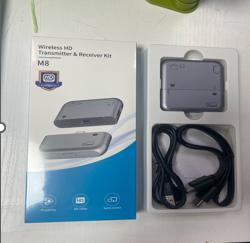
Compact Wireless HDMI Transmitter & Receiver
Compact Wireless HDMI Transmitter & Receiver
Out of stock
Couldn't load pickup availability
-
Ordered
- - -
Order Ready
- - -
Delivered

Compact Wireless HDMI Transmitter & Receiver
Compact Wireless HDMI Transmitter & Receiver
Banish The Professional Embarrassment Of Fumbling With Tangled Presentation Cord Lines, Reclaim Absolute Visual Mobility Inside Open Media Rooms, And Enjoy Fluid Wireless High-Definition Mirroring Using The Professional Compact Wireless HDMI Transmitter & Receiver System.
How Power is Supplied
- Transmitter (TX - the one with the Type-C plug): This plugs directly into your laptop, smartphone, or PC. It draws its operational power directly from the host device's Type-C port via bus-power. No external power cord is needed for the TX as long as your laptop port supplies power.
- Receiver (RX - the one with the USB-C port and HDMI slot): This connects to your TV or monitor. Since HDMI ports on displays typically do not output enough power, you must plug a standard USB-C cable into the side port of the RX and connect it to a standard 5V/1A USB wall adapter or an available USB port on your TV.
Product Benefits
Saves Presentations From Ugly Cable Messes Instantly: Cordless Wireless Connection Array Replaces Trailing Table cords With A Sleek Hidden Digital Signal Airpath.
Guarantees Hassle-Free Guest Access via Hardware Pairing: True Driverless Hardware Decoding Skips Annoying IT Department System Approvals, Code Downloads, and App Installations.
Provides a Direct Cable-Free Smartphone and Laptop Interface: Integrated USB-C Connector Pins Plug Directly into Modern Devices Without Dangling Intermediary Adapters.
Maintains Consistent Operational Coolness Over Long Meetings: Intricate Ventilation Airflow Arrays Dissipate Trapped Component Thermal Loads Continually.
Protects Presentation Streaming from Crowded local Routers: Independent Point-To-Point Wireless Streams Avoid Passing Data Through Overburdened Local Office Wi-Fi Routes.
High-Margin Core Innovation For Technology Sourcing Portals: Supplies Global Office Infrastructure Outfitters, Consumer Tech Brands, and Digital Sourcing Portals a Top-Tier Enterprise Tech Asset.
FAQs
Do I need to install software or connect the wireless transmitters to the local building Wi-Fi network for it to stream video?
Not at all. The entire system is engineered for autonomous hardware-level operation. It uses a dedicated, pre-paired point-to-point wireless signal to communicate directly between the transmitter (TX) and receiver (RX) modules, completely eliminating app configuration steps and corporate network passwords.
Can I plug the transmitter unit directly into a smartphone or tablet that has a standard USB-C port?
Yes, absolutely. The transmitter module (TX) features an integrated, low-profile male USB-C connection pin coming right out of its side casing wall. This lets you plug it straight into compatible modern smartphones, tablets, and lightweight laptops without using tangled patch cables.
Does the compact receiver housing get overly hot when streaming high-definition video loops for several hours?
The receiver unit is engineered with an advanced passive thermal management layout featuring an array of precision-milled ventilation micro-holes. This pattern-milled mesh structure allows warm internal air to vent continuously, ensuring optimal, cool performance throughout long workspace sessions.
What do the tiny linear white markings near the edge of the silver casings indicate?
Those markings house integrated micro-LED status indicators. When the modules are active, these subtle light windows illuminate to provide instant, real-time feedback that the transmitter and receiver have successfully established a locked over-the-air signal bridge.
Is this wireless transmitter set compatible with legacy projectors or monitors that only possess standard VGA connection ports?
The device is designed natively with a high-bandwidth digital HDMI connector interface on the receiver unit to maximize image resolution and audio output. To deploy the system across legacy display components, simply bridge the receiver using a separate premium HDMI-to-VGA conversion adapter.
Return & Exchange Policy
Return & Exchange Policy
- 7-day easy returns
- Free exchange on size issues
- Original packaging required
Care Instructions
Care Instructions
- Keep away from water
- Wipe with dry cloth
- Use shoe polish to maintain shine
- Store in box when not in use